24-Inch Adjustable Laptop Desk: Rotating Top + Phone Stand
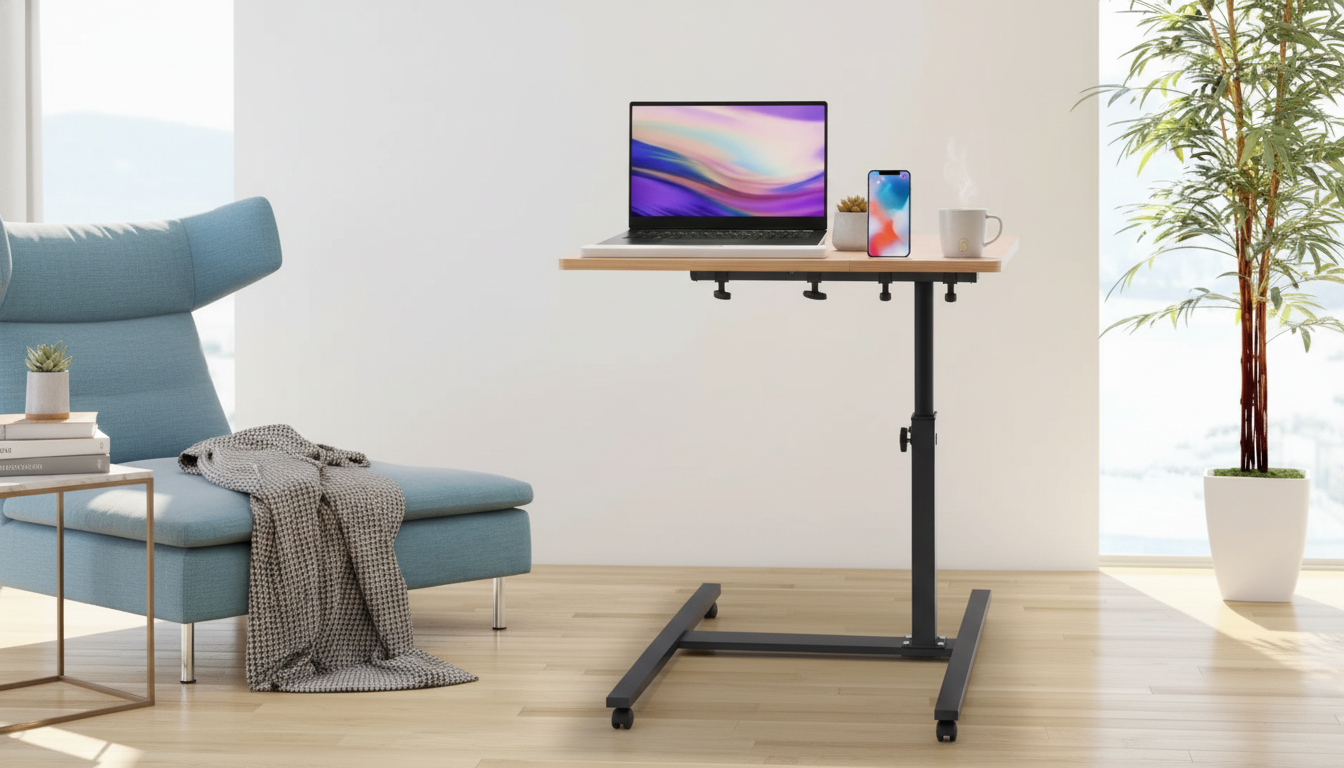
Adjustable 24 Inch Laptop Desk with 360° Rotating Top and Mobile Stand
A compact laptop desk can turn a couch, bed, or small home office corner into a comfortable workstation. With a 24-inch surface, height adjustability, a 360° rotating top, and a dedicated mobile stand, this style of desk helps keep screens at a more usable angle, reduces clutter, and makes quick position changes easier during work, study, or streaming—especially when a full-size desk simply won’t fit.
What This Desk Is Designed to Do
- Create a stable surface for a laptop in spaces where a full-size desk won’t fit
- Support frequent posture changes with adjustable height and a rotating work surface
- Keep a phone visible for calls, timers, or notifications using the built-in mobile stand
- Work well for short sessions at the couch/bed and as a secondary workstation in small rooms
Key Features That Matter Day to Day
- 24-inch tabletop footprint: Big enough for most laptops while staying easy to move and place in tight areas.
- 360° rotating top: Reposition the work surface without lifting or dragging the entire desk—useful when you shift from the middle of the couch to a corner seat.
- Height adjustability: Helps align the laptop closer to eye level depending on your seat height, reducing the urge to hunch forward.
- Mobile stand: Keeps a phone upright and separate from the main work area so notifications and call controls stay glanceable.
- Practical daily workspace: Supports note-taking and light accessories like earbuds, a small notebook, or a compact mouse (space permitting).
Common Tasks and Helpful Setup Choices
| Task | Suggested setup | Why it helps |
|---|---|---|
| Video calls | Raise desk to a comfortable seated height; keep phone in the mobile stand | Reduces neck bending and keeps call controls visible |
| Typing and emails | Keep laptop centered; rotate top to match seating angle | Maintains a straighter wrist/arm position without twisting the body |
| Studying/reading | Slightly elevate height; rotate top as needed for light changes | Improves viewing angle and reduces slouching |
| Streaming on the couch | Lower height; rotate top toward seating position | Keeps the screen stable and easier to view without holding the device |
Where a Rotating Top Makes the Biggest Difference
- Shared spaces: Rotate the surface when changing from sofa to chair without dragging the whole desk across the floor.
- Corner setups: Turn the top to avoid an awkward reach when the desk is tucked beside a bed, recliner, or armchair.
- Quick transitions: Pivot between typing and showing the screen to someone nearby (or repositioning toward a second monitor or TV).
- Cable alignment: Rotation can help aim charging cables toward the nearest outlet, reducing strain on ports and minimizing cord bend.
Using the Mobile Stand Effectively
- Place the phone on the stand for meeting apps, two-factor authentication prompts, or reference notes while keeping the laptop display focused on the main task.
- Use it for timers, playlists, or quick message checks without stacking the phone on top of papers or beside the trackpad.
- Keep the phone at a glanceable angle to reduce repeated pick-ups that can break focus.
- If using the phone camera for calls, test framing and lighting before longer sessions so you’re not constantly adjusting mid-meeting.
Comfort and Ergonomics Basics for Compact Workstations
- Aim for a neutral neck position: Bringing the screen closer to eye level helps reduce forward head tilt, a common cause of neck fatigue.
- Keep shoulders relaxed: Elbows closer to the body while typing can feel easier on shoulders and upper back than reaching forward for long periods.
- Consider peripherals for longer sessions: If the laptop sits high enough for viewing but the keyboard feels too high, an external keyboard (and mouse) can improve comfort during extended work blocks.
- Use adjustability regularly: The biggest ergonomic benefit comes from small changes throughout the day—rotate the top, change height, and take short breaks.
For additional workstation guidance, the OSHA Computer Workstations eTool and the NIOSH ergonomics resources offer practical, research-based recommendations for monitor height, posture, and healthy work habits.
Fit, Placement, and Practical Considerations
Product Details and Buying Option
- Product: Adjustable 24 Inch Laptop Desk with 360° Rotating Top and Mobile Stand
- Price: $53.67 (USD)
- Availability: In stock
- Best for: Small spaces, flexible seating, quick angle changes, and keeping a phone upright while working
For a practical home setup beyond the desk, a reliable light source can help during late-night study sessions or power outages. Consider the Water-Resistant LED Camping Lantern for Indoor & Outdoor Use. For kitchen multitasking when the workday ends, the 9-Cup Food Processor with 600W Motor – Chops, Slices, Shreds & Kneads is another in-stock option worth a look.
Care, Cleaning, and Longevity Tips
FAQ
Will a 24-inch laptop desk fit a larger laptop?
Most laptops fit on a 24-inch surface, but a larger footprint may reduce space for a mouse or notebook. Measure your laptop’s width and depth, and leave a little room for hand placement and ventilation.
Does a rotating tabletop help with ergonomics?
Yes—rotation can reduce torso twisting and awkward reaching when your seating position changes or the desk sits at an angle. Staying more “square” to the screen and keyboard can make posture feel more natural over time.
Is a laptop desk comfortable for all-day work?
It can be, especially with supportive seating and occasional position changes using the height adjustment and rotation. For longer sessions, an external keyboard and mouse can help if the laptop sits higher for better screen viewing.









Leave a comment